
Hey family! We know that you are excited! You have dreamed of getting settled in the Gulf countries and being the pride of your town. We know the feeling of being the one in your bloodline to get settled overseas.
But there is one catch: Failure to fill out your GAMCA medical registration can be detrimental for you, as this is the crucial step for your success. Knowing how to fill out your medical registration would mean faster Visa approval and your flight to the Gulf. In this online copy, we will provide you with detailed steps on how you can fill out your registration without any errors
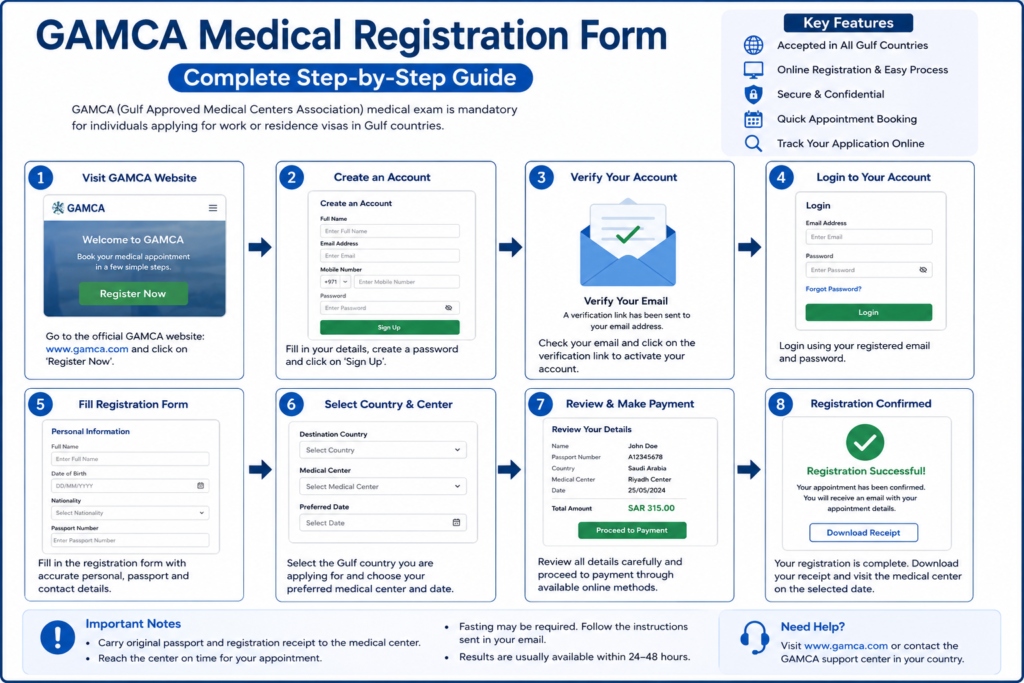
Reminder: Before we let you know about the fill-up process, we would like to tell you that the GAMCA medical registration procedure is an online fill-up. Once the form is filled out, you will be directed to your nearest GAMCA medical centre, which will conduct your GCC medical test.
How to fill out the GAMCA registration in less than 2 minutes
Step 1: In the search bar, type in “ GAMCA medical registration form” and click on the first or second link that comes up in your search engine. It should look something like features image…
Step 2: Once you open the landing page, fill in the section that asks you for the Gulf country that you want to select and the city you are currently residing in. Based on your input, the system will show the nearest GAMCA medical centre that is closest to you.
Step 3: Once you have done that, you will be asked to enter your personal details like nationality, date of birth, gender, passport details, name, and other details. Even a single spelling error during this test can cancel your rejection. The window looks something like this :
Step 4: After you have completed step 3, you will be directed to the payment page, where you need to pay for your GCC medical tests that will be conducted in your GAMCA medical centre.
Step 5: Once the payment is made, you will be assigned a GAMCA medical centre near you. Note: You cannot change your medical centre; the system will generate that for you
Step 6: After you know your centre, the payment will be sent to your email instantly.
Vola ! You are all set. Now all you have to do is download the appointment slip and carry it with you during your GCC tests. This will serve as a digital proof that you have done your appointment online.
What happens if there are mistakes in personal details?
In this case, a correction request needs to be sent to the GAMCA medical centre that is assigned to you. Please note that the centre has the right to reject your request. This mainly depends on the policies of the medical centre. 80 % of the percent of the time, the medical centre would grant your correction request. If that doesn’t happen, a new GAMCA booking needs to be made, and yes, you need to pay again for your GCC tests.
Quick tips to avoid rejection
- When you fill in your personal details, check them multiple times so that you get them correct the first time
- Make sure that you do your online registration from an authenticated website
- Make sure that you have a stable internet connection so that you dont have to refresh the page and add your details again
- Double-check everything before the final submission
Take-way
We don’t want your hopes of getting settled in the Gulf to be crushed due to a failure in online fill-up. This is the reason why we have decided to dedicate a copy that would act as a lifesaver. Once you are done with it, you will be directed to the nearest GAMCA medical lab that conducts your GCC tests. All the best for your job journey ahead.
